
Introducing Schoology
As we have adapted to remote learning, we have had a unique opportunity to better understand the technology we use to educate our students. As we embark on a new reality that will undoubtedly involve more online learning opportunities for students, we felt it was critical that we take a closer look at Google Classroom to determine if it will meet our future needs.
Therefore, we are excited to share that we are replacing Google Classroom with Schoology starting in the 2020-2021 school year.
What is Schoology?
Schoology is a learning management system (LMS) designed to deliver engaging content and lessons for students in kindergarten through high school. Schoology provides tools for instruction and assessment, and offers a communication and collaboration platform that brings together students, teachers, parents and administrators. Schoology also integrates with other systems we use, including PowerSchool, Infinite Campus and Google Drive, allowing for better alignment of information across our technology platforms.
More than 1,600 school districts and 60,000 schools across the country use Schoology to deliver online learning, and we are excited to use this platform to provide enhanced educational opportunities for our Legacy students. Watch this video to learn more about Schoology.
How is Legacy using Schoology?
Legacy will use Schoology to support instruction and will be part of every teacher’s classroom. Teachers will no longer use Google Classroom for instructional and non-instructional purposes. Rather, teachers will use Schoology to deliver supporting classroom materials, and engage with students and parents online.
In addition to supplementing classroom instruction, Schoology may also be used to deliver an entire course for students. As we continue to determine our next steps in online education for the 2020-2021 school year, we will be able to use the Schoology platform to adapt to the changing expectations of students and families.
Log in to Schoology
To log in to your Legacy Schoology account, click the link for your state:
- Arizona: legacyaz.schoology.com
- Nevada: legacynv.schoology.com
You will be prompted to use your Legacy email address credentials to log in.
New Teachers: You will receive your Legacy Schoology account in mid-July. Until then, you are welcome to create a temporary Schoology account. Simply follow these steps:
- Go to schoology.com
- Hover over “Sign Up” in the upper right corner of the screen and click “Instructor”
- Complete the form. Do not use a Legacy email address.
- Click “Register”
You do not need to enter a school name once you click “Register.”
If you need assistance with your Schoology account, contact ltsitsupport@legacytraditional.org.
Self-Paced Getting Started Course
Once you have logged into Schoology, be sure to sign up for your first training course. You can start to learn more about Schoology by completing the Self-Paced Getting Started with Schoology Course.
Follow these steps to access the course:
- Select “Courses” from the top menu

- Select “My Courses” on the far right-hand side of the screen
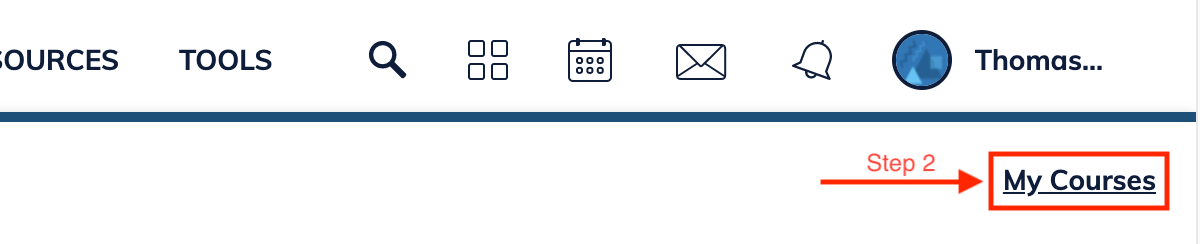
- Under “Manage Courses” select “Join a Course“
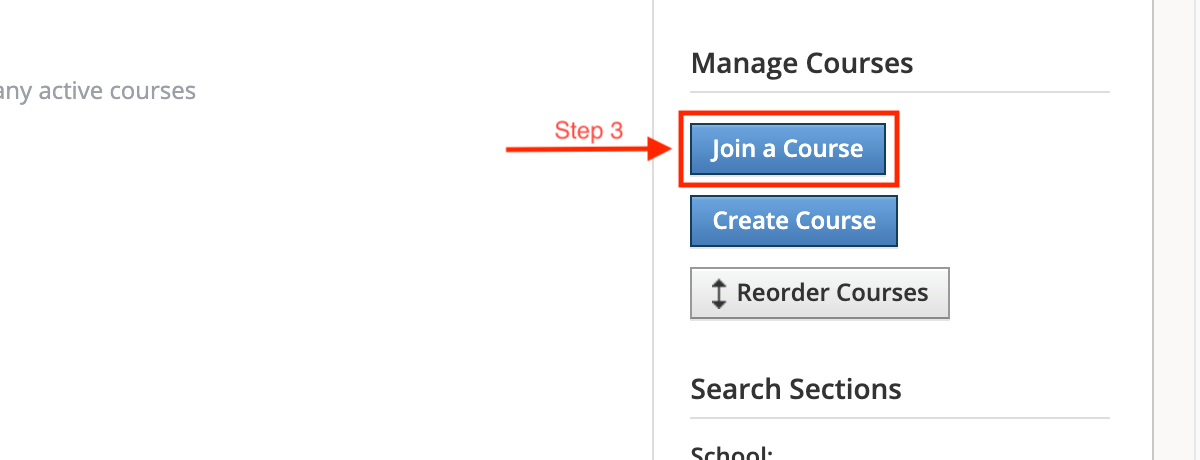
- Enter the following access code: DWWG-XB63-R2XH6
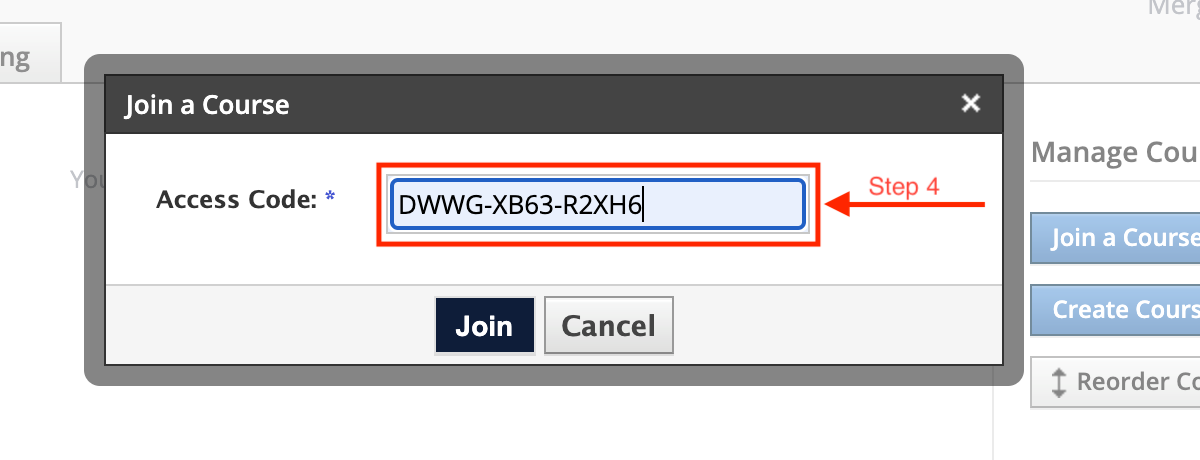
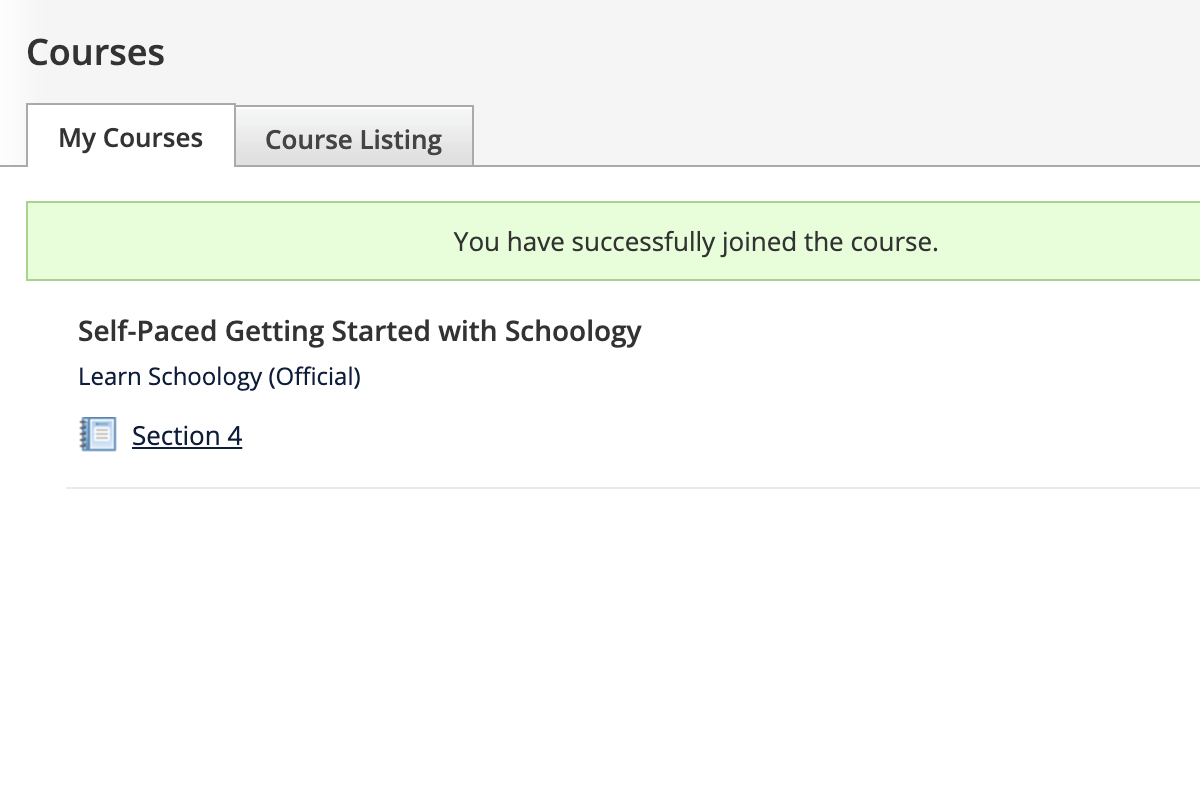
- The course will then appear in your Courses menu. Your are welcome to start walking through the course materials!
Videos
New to Schoology? Learn the Basics for Online Learning
Schoology Resources
Schoology Assignments - Part 1
Schoology Assignments - Part 2
Schoology Discussions - Part 1
Schoology Discussions - Part 2
How to Create Schoology Pages
Frequently Asked Questions
To log in to your Legacy Schoology account, click the link for your state:
- Arizona: legacyaz.schoology.com
- Nevada: legacynv.schoology.com
You will be prompted to use your Legacy email address credentials to log in.
New Teachers: You will receive your Legacy Schoology account in mid-July. Until then, you are welcome to create a temporary Schoology account. Simply follow these steps:
- Go to schoology.com
- Hover over “Sign Up” in the upper right corner of the screen and click “Instructor”
- Complete the form. Do not use a Legacy email address.
- Click “Register”
You do not need to enter a school name once you click “Register.”
If you need assistance with your Schoology account, contact ltsitsupport@legacytraditional.org.
In the midst of our remote learning endeavors, we learned that Google Classroom does not allow us to deliver content and curriculum in a way that provides a full online learning experience for students.
With Schoology, we can better support student learning by providing curriculum and instruction entirely within the platform, allowing us to assess and grade student knowledge beyond simply participation in the material.
Yes. Schoology has integrations with Google and will allow teachers to build dynamic, student-centered courses using already available Google tools, collaborating on Google documents, and using Google Docs, Sheets, and Slides for assignments. The management system may be different, but the core things you use from day-to-day aren’t going anywhere.
No. One of the highlights of Google Classroom was how so many different people utilized it for things outside of just the classroom. From Instructional Coach resource pages to Superintendent Updates, it was an easy way to deliver content/information to our staff. Schoology will continue to offer this and more. Due to the capabilities of Schoology, we can utilize this program to provide and track professional development for teachers, offer parent-resources and training via Schoology, and expand our opportunities to show people all the amazing things you all are doing inside the classroom day in and day out.
Schoology gives parents and students their own accounts, which means you can more easily reach out to parents directly. Teachers can create updates that will alert parents about things such as weekly classroom updates, school events, and requests for volunteers. And, parents can contact teachers directly through the features in Schoology. Not only that, but there’s a Schoology app that gives parents the information they need to know about how their child is doing in class.